Overview
Account security protects your content workflow, platform connections, approvals, and reporting. This guide explains how to manage workspace access, team permissions, and connected social accounts safely.
Common account-security risks include:
- shared credentials
- weak email security
- outdated user access
- expired or over-permissioned platform connections
- poor response when suspicious activity appears
Core Security Principles
Asteria works best when you follow five basic rules:
- every user has their own account
- high-privilege roles are kept limited
- passwords are strong and unique
- 2FA is enabled wherever possible
- platform access is reviewed regularly, not only after something goes wrong
Password and Sign-In Security
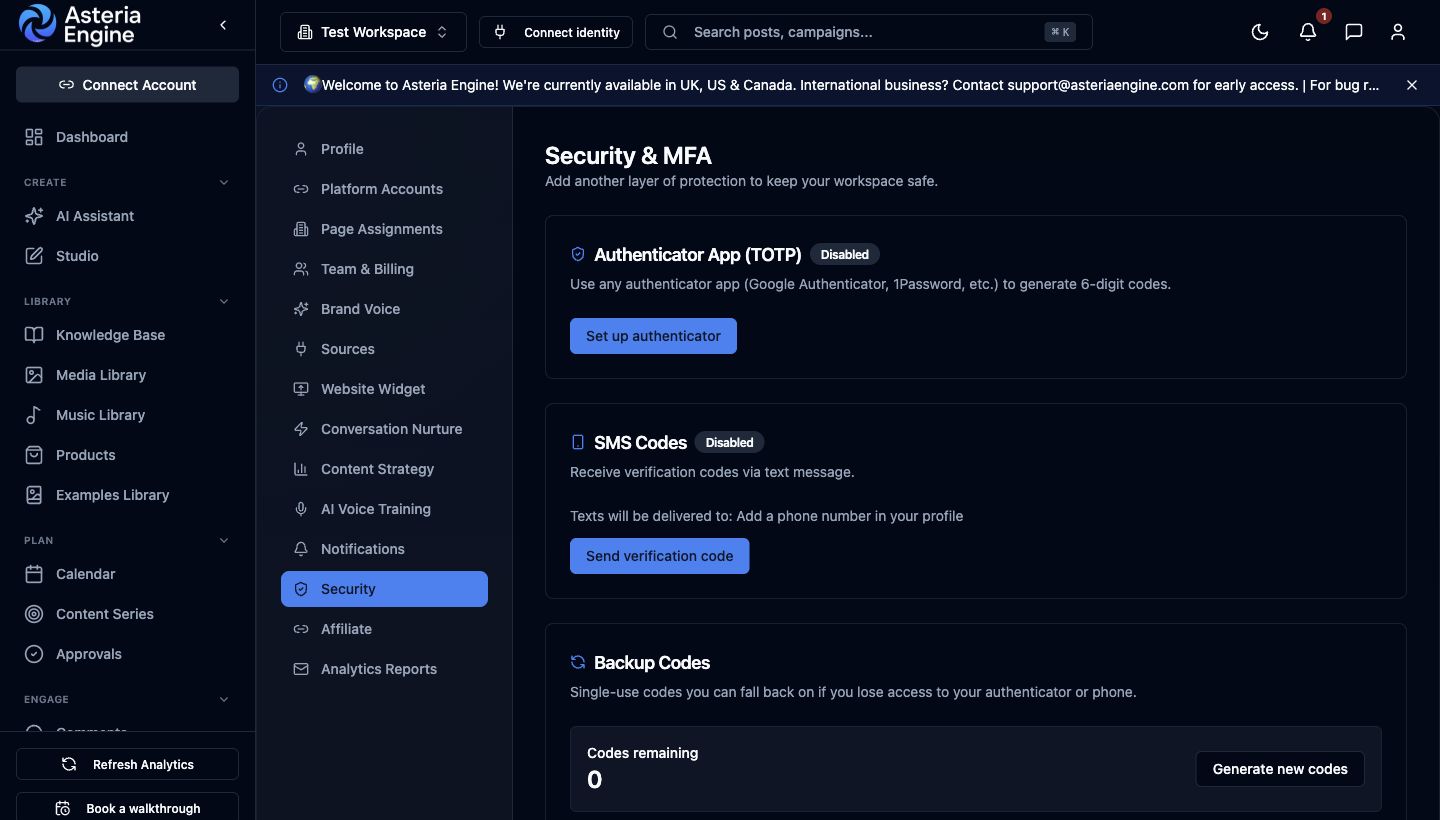 1. Open Security in Settings. 2. Configure an available MFA method. 3. Generate and store backup codes safely.
Password standards
Create a password that is difficult to guess and not reused anywhere else.
Recommended baseline:
- at least 12 characters where practical
- a mix of upper and lowercase letters
- numbers and special characters
- no personal details or common phrases
- no reuse from other SaaS tools, email accounts, or social platforms
Password managers make this much easier. They also reduce the chance of “convenient” password reuse across critical tools.
Two-factor authentication (2FA)
Asteria supports two-factor authentication for stronger account protection. If your workspace depends on regular publishing, turn it on as part of initial security setup rather than waiting until later.
Even with 2FA enabled on Asteria, your email account still matters enormously. Your email inbox is usually the recovery path for password resets, login alerts, and security communication. If your email account is weak, your Asteria security is weak by extension.
Shared devices
Avoid using shared or public devices for routine account access. If you must use one temporarily:
- log out fully when finished
- do not save credentials in the browser
- clear browser session data if the device is not trusted
Protecting Your Email Account
Your email account is one of the highest-risk dependencies in the entire stack.
Make sure the email tied to your Asteria account has:
- its own strong unique password
- 2FA enabled
- recovery options you still control
- no stale delegates or forwarding rules you forgot about
If an attacker controls your email account, they often do not need your Asteria password at all.
Team Access and Permissions
Assign roles carefully
Asteria separates access by role. Keep elevated roles limited to people who genuinely need them.
| Role | Best used for | Key security note |
|---|---|---|
| Owner | Accountable senior team member or business owner | Keep this role very limited |
| Manager | Team leads or client leads | Broad access without owner-level billing control |
| Editor | Content operators | Enough access to work without overexposure |
| Viewer | Stakeholders and observers | Lowest-risk option for visibility |
Practical access rules
- do not share the Owner account
- use Viewer for oversight users who do not need to edit
- give Manager only to people who truly manage workflow or teams
- review membership after staffing changes, client changes, or contractor exits
Offboarding checklist
When someone leaves the team or stops working on the account:
- remove them from the workspace immediately
- review recent activity if needed
- check for any scheduled content they owned
- rotate any shared external credentials that existed outside Asteria
Fast offboarding is one of the most important practical security controls for agencies and growing teams.
Connected Social Platform Security
Why platform access deserves its own review
Asteria depends on access tokens and permissions granted by each social platform. If those permissions are poorly managed, the problem may not begin in Asteria itself. It may begin inside the connected channel account.
Good platform hygiene
For each connected channel:
- review third-party app access periodically
- remove integrations you no longer use
- monitor unusual publishing or account activity
- keep primary admins identifiable and current
- avoid mixing personal and business access casually
Quick reference: where to review connected apps
- Go to Settings & Privacy
- Open Data privacy
- Review third-party apps
- Open Settings
- Review Apps and Websites
- Check active business-related connections
- Open Settings
- Go to Security
- Review Apps and Websites
X
- Go to Security and account access
- Review Apps and sessions
- Revoke unused integrations
These checks do not need to happen every week. Quarterly review is usually enough unless your team changes often.
Recognising Security Problems Early
Warning signs worth taking seriously
Investigate quickly if you notice:
- password reset emails you did not request
- login alerts from unfamiliar devices or locations
- posts appearing that no one on the team scheduled
- unexplained connection changes or permission prompts
- suspicious payment or billing-related emails
Phishing basics
Asteria will not ask you to send your password over email. Treat urgent “verify now” messages carefully.
Before clicking any security-related link:
- inspect the sender address
- hover over the URL first
- go to the site directly if unsure
- avoid reacting quickly to pressure-based language
Operationally, phishing is still one of the easiest ways for attackers to get past otherwise reasonable controls.
Privacy and Data Handling
What Asteria uses data for
Asteria processes data such as:
- account information
- workspace content and scheduled posts
- connected platform analytics
- product usage signals needed to operate and improve the service
What this does not mean
Operational use of data does not mean unrestricted use of data. Public trust depends on tight handling and clear expectations.
Your practical rights
You can request help with:
- accessing your data
- correcting inaccurate details
- exporting relevant information
- deleting your account and associated data where applicable
For trust, governance, or privacy-specific questions, the public Security and Data Processing Agreement pages are also relevant.
Asteria Security Controls in Practice
Sessions and account control
Asteria uses account sessions rather than a permanently open state. Good practice is still required on your side:
- log out when using untrusted devices
- avoid staying signed in everywhere indefinitely
- review which people should still have access to the workspace
Password resets
Password reset flows are sensitive because they sit close to account recovery.
Treat password reset events as notable. If someone requests a reset unexpectedly, that should trigger a quick check rather than being ignored.
Security issue response
If you suspect a security problem:
- change your password immediately
- review your email account security
- remove or review suspicious sessions where possible
- inspect connected platforms for unusual activity
- contact support with a clear incident summary
A fast, structured response is far more useful than a vague report sent hours later.
Compliance Mindset
Security is not only about preventing compromise. It is also about proving that your operating process is credible.
For many buyers, clients, and regulated teams, the signals that matter include:
- clear role separation
- controlled access to publishing systems
- sensible review and approval flows
- documented trust and data-processing posture
- quick removal of ex-users and stale access
That is one reason these docs matter. Serious teams want a platform that communicates control, not casualness.
Security Checklist
Use this checklist at workspace launch and then revisit it quarterly.
- Strong unique password in place
- Password stored in a password manager
- 2FA enabled where appropriate
- Email account secured with 2FA
- Owner access limited to the right people
- Team membership reviewed
- Connected social apps reviewed
- Ex-team members removed promptly
- Phishing awareness reviewed with the team
- Official login page bookmarked
When to Escalate
Use the support or contact path quickly if:
- you suspect unauthorised access
- platform permissions appear to have changed unexpectedly
- you see unexplained publishing activity
- you need help understanding the impact of a security event
For general support, use Contact. For trust-related context, also review the public Security page.