Overview
Asteria Engine’s AI content workflow helps teams turn a rough idea into reviewable social content with greater speed and consistency. It uses workspace context, brand settings, example posts, and platform-specific requirements to shape each draft.
This guide explains how to get better output, when to use Chat versus Multi-Agent generation, and how to keep AI content aligned with the real standards of your brand.
What Makes AI Output Good in Asteria
The biggest factor in quality is not the model alone. It is the quality of the context you give it.
Strong output usually depends on:
- clear brand settings
- realistic audience definition
- strong example posts
- useful prompts with actual business detail
- post-generation review by a team member
If those inputs are weak, the output usually becomes generic even if the technology is strong.
First-Time Setup Before Generating Anything
Brand settings first
Before you generate content, go to Settings > Brand Voice and complete the key context fields.
Prioritise:
- brand personality and tone
- target audience
- topics to focus on
- topics to avoid
- key phrases and brand messages
- competitors or market references
- website URL for added business context
This is the layer that tells the AI how your business should sound and what it should care about.
Example posts next
Example posts help the system understand what “good” looks like for your brand in practice.
Add examples that reflect:
- your actual tone
- good structure
- relevant CTA style
- realistic hashtag use
- the kind of post quality you want repeated
A smaller set of strong examples is more useful than a large set of weak ones.
Two Main Ways to Generate Content
Choose the workflow that matches the amount of content and level of collaboration you need.
AI Chat
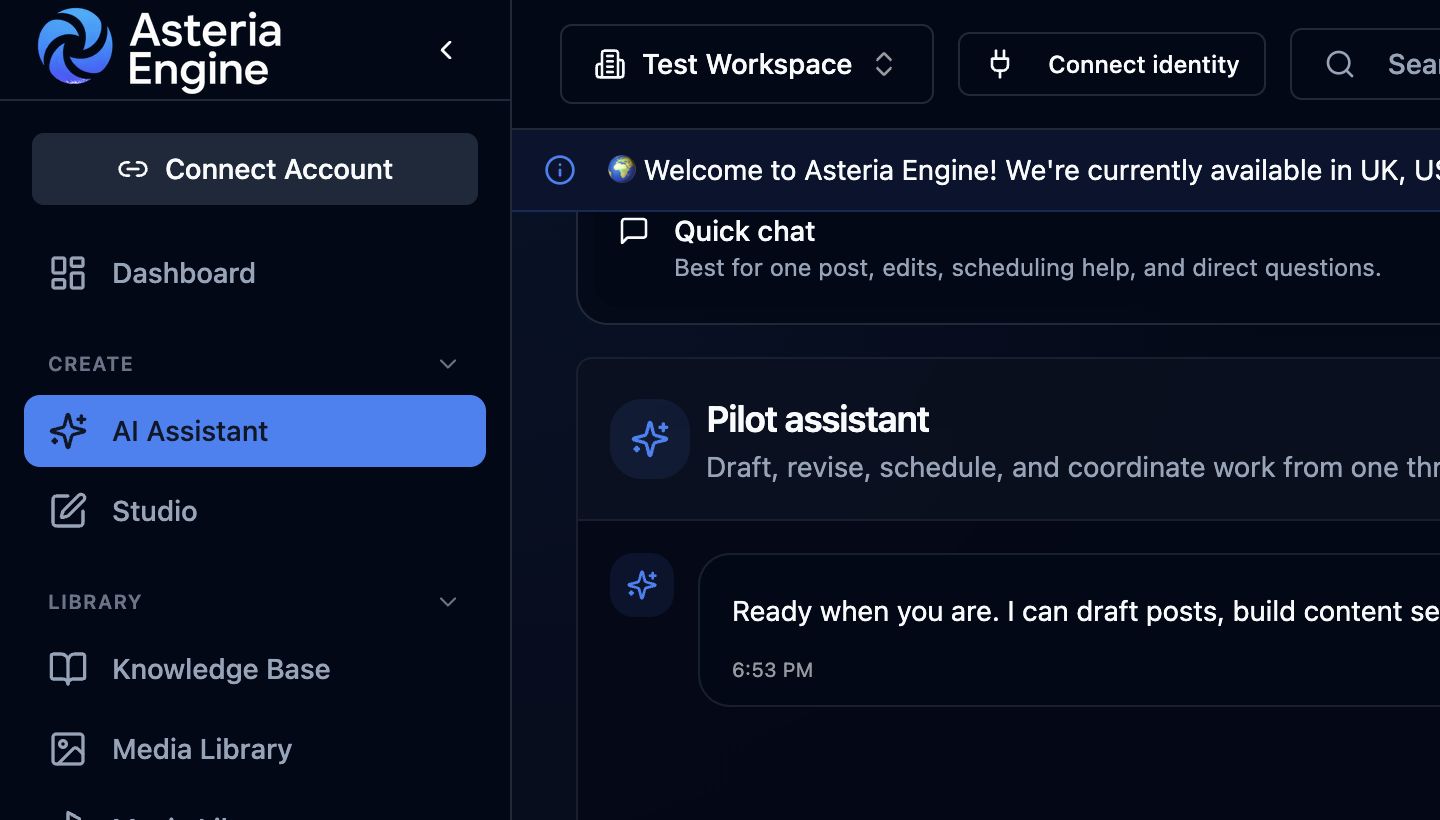 1. Open AI Assistant from the navigation. 2. Use Quick chat for direct drafting and scheduling requests.
Use AI Chat when you want a direct conversational drafting flow.
Typical uses:
- one-off LinkedIn or Instagram posts
- rewriting a caption quickly
- testing different angles on the same idea
- refining an existing draft interactively
AI Chat workflow
- Open AI Assistant
- Choose the Quick chat tab
- Describe the content you need
- Review the draft
- ask for revisions in the same thread if needed
What makes a strong prompt
A good prompt usually includes:
- the platform
- the topic
- the target audience
- the tone
- the desired outcome or CTA
- any mandatory context or limits
Example:
Write a LinkedIn post for UK business owners about why inconsistent posting hurts trust. Keep it professional, concise, and end with a CTA to review their content workflow.
When Chat is the better choice
Use Chat when speed, iteration, and editorial control matter more than automation breadth.
Multi-Agent Workflow
Use Multi-Agent when you need a broader workflow than a single draft.
This is more appropriate when you want to:
- generate multiple pieces of content at once
- support a campaign or scheduled burst
- create across several channels
- work from a higher-level brief rather than a single post request
Multi-Agent execution steps
- Open AI Assistant
- Choose the Multi-Agent tab
- define the campaign topic or objective
- choose the platforms
- choose the content type
- select timing or scheduling context
- generate and review the output
When Multi-Agent is the better choice
Use it when you need a structured set of drafts for a campaign or publishing period.
This is often the better route for:
- agencies filling a calendar efficiently
- internal teams planning a week or month ahead
- multi-platform campaign coordination
- repetitive content production that still needs variation
Prompt Templates
Prompt templates help teams stop reinventing the same prompt structure repeatedly.
Use them for recurring content patterns such as:
- weekly tips
- product updates
- thought-leadership prompts
- customer story prompts
- campaign-specific content structures
Why templates matter
Templates improve:
- consistency
- speed
- onboarding for new operators
- repeatability across a team
The more people generating content in the same workspace, the more useful prompt templates become.
Content Types and Workflow Fit
| Format | Typical output |
|---|---|
| Text post | Caption, hashtags, CTA |
| Image post | Caption plus AI-assisted image workflow |
| Carousel | Multi-part caption and visual sequence support |
| Video | Caption plus video-oriented workflow where supported |
| Document | Document-style post workflow, especially relevant to LinkedIn |
Choose the format that best matches the content goal and target platform.
Platform-Specific Behaviour
Asteria adapts output based on the destination channel.
Typically better for:
- professional tone
- proof-led or insight-led content
- longer caption structures
- business positioning and authority
Typically better for:
- visually led storytelling
- stronger creative hooks
- short, sharp engagement framing
- caption structures that support saves and shares
Typically better for:
- community-style updates
- broader business communication
- link-friendly or informative content
X
Typically better for:
- tighter hooks
- compressed message structures
- reactive commentary and short-form insight
TikTok
Typically better for:
- hook-first content
- short-form video framing
- faster, more direct caption logic
YouTube
Typically better for:
- title and description support
- video-oriented metadata thinking
- broader search-aware structuring
The important point is not that each platform gets different word counts. It is that each platform rewards a different communication style.
Reviewing and Refining Output
AI-generated content should not be treated as publish-ready by default.
Review for these issues every time
- factual accuracy
- brand voice fit
- tone appropriateness
- weak CTA
- generic phrasing
- compliance or sensitivity issues
- repetition versus recent posts
Ways to refine
You can refine through:
- follow-up instructions in Chat
- manual edits in the post editor
- stronger example posts
- better brand settings
- stronger prompt templates
If the same type of issue happens repeatedly, fix the context layer rather than editing around the problem forever.
How to Get Better Results Over Time
Improve the inputs
If results feel weak, generic, or inconsistent, the best fixes are usually:
- add better example posts
- improve brand settings
- use more specific prompts
- define the audience more clearly
- stop asking for vague “social media content” and ask for a concrete business outcome
Use performance data as feedback
Over time, published-post performance helps you identify:
- which tones are working
- which formats are carrying attention
- which themes deserve more output
- which CTA patterns should be repeated
This is why AI content should be paired with the Analytics Guide, not separated from it.
Best Practices
Do
- be specific about the business topic
- define the audience clearly
- state the platform explicitly
- review every output before publishing
- use example posts to shape quality over time
- align content generation with calendar planning instead of treating it as isolated drafting
Do not
- rely on AI for sensitive crisis communication without senior review
- assume one strong prompt solves long-term brand consistency
- publish output without a human check
- ignore what performance data is telling you after publication
Common Problems and Fixes
The content sounds generic
Usually caused by:
- weak brand settings
- vague prompts
- no example posts
- unclear audience context
The tone is wrong
Usually fixed by:
- updating tone and brand guidance
- adding better example posts
- asking for a more specific voice in the prompt
Hashtags feel repetitive
Usually improved by:
- adding better topic and niche context
- tightening the brand keyword list
- reviewing whether that platform needs the suggested number of hashtags
Output quality varies too much
That often means the process is too prompt-dependent. Use templates and better example content to reduce variance.
Recommended Next Steps
To get more value from AI generation, pair this guide with:
AI content is most useful when generation remains connected to planning, review, publishing, and performance feedback.