Overview
TikTok connection and publishing depend on account type, approval state, video format, and platform policies. Review these requirements before connecting the channel so publishing and reporting behave as expected.
This guide explains how to connect TikTok, prepare suitable video content, understand platform limitations, and include the channel in your wider content workflow.
Before You Start
Use the right account type
Asteria’s TikTok workflow depends on the correct business-facing account setup. If the account is still personal or loosely configured, the connection process will usually become unreliable.
Expect extra friction versus other channels
TikTok is not like LinkedIn or Facebook, where the connection path is often relatively direct. Access, review, and operational constraints tend to be tighter, so plan accordingly.
Confirm the channel fits your strategy
Before doing the setup work, ask whether TikTok genuinely belongs in the brand’s content system.
Good reasons to connect it include:
- short-form video is central to the audience strategy
- the team already produces or can sustain vertical video
- there is a clear commercial or awareness case for the channel
- the business is prepared for a faster-moving creative cycle
If none of those are true, the channel may create more process overhead than value.
Connection Workflow
Step 1: Prepare the account and approval state
Before starting inside Asteria, make sure the TikTok account is correctly configured and, where required, approved for the relevant third-party workflow.
Step 2: Open Platform Accounts in Asteria
- Sign in to Asteria Engine
- Go to Settings > Platform Accounts
- Scroll to Connect a new platform
- Click Connect TikTok. If TikTok is already connected, the button appears as Connect another
- Follow the on-screen instructions to complete the flow
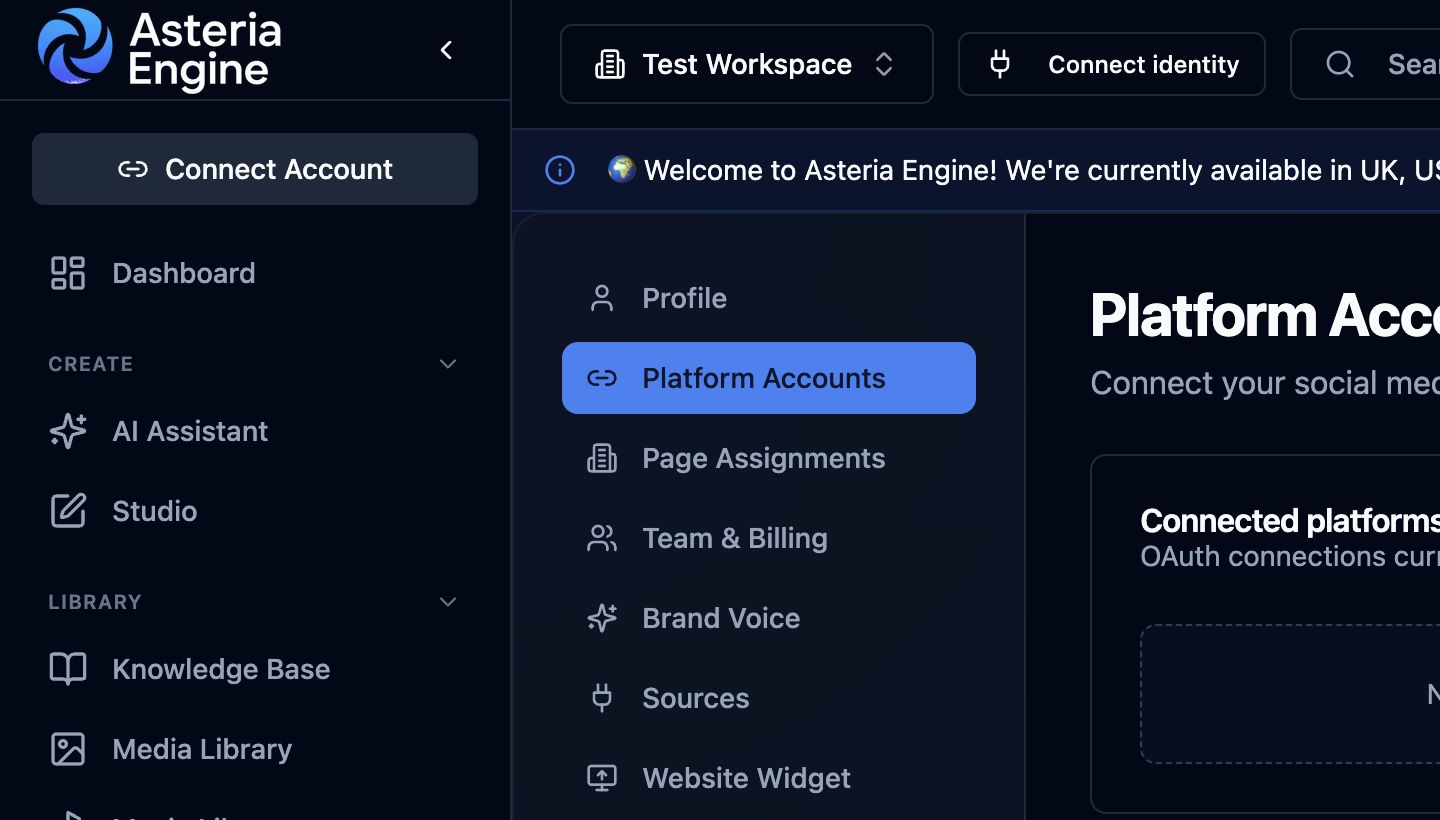 1. Open Platform Accounts in Settings, then scroll to Connect a new platform and choose the provider.
Step 3: Authorise the correct TikTok account
During authorisation:
- use the correct business account
- review the requested permissions
- continue only once you are sure you are authorising the right channel
Step 4: Return to Asteria and verify status
After the flow completes, the TikTok account should appear in Asteria as active. Confirm the connected identity matches the workspace you intended to configure.
If the provider returns accounts that do not belong to this workspace, disconnect and delete them. Then go to Settings > Page Assignments and remove incorrect assignments with the bin icon.
What the TikTok Connection Is Best Used For
Treat TikTok as a video-first workflow rather than another generic social channel.
The connection is most useful when the team needs to:
- schedule and organise short-form video publishing
- include TikTok in the wider content calendar
- keep TikTok inside the same approval and planning system as the other channels
- compare TikTok performance against the rest of the social stack later
That matters because TikTok often creates pressure for speed. Asteria is useful when it helps you keep that speed inside a more controlled workflow.
Content and Asset Reality on TikTok
TikTok is unusually sensitive to creative quality, format fit, and audience-hook strength.
What usually matters most
- strong first seconds
- correct vertical framing
- clean source files
- channel-appropriate tone
- clarity about what the viewer should do next
What often goes wrong
Teams frequently assume a TikTok workflow is just “upload any vertical video and add hashtags.” In practice, weak hooks, poor framing, or low-context captions can make the content underperform even when the setup itself is technically correct.
For the content side of the workflow, also review the AI Content Generation Guide and Media Library Guide.
Practical Limitations
Treat TikTok limits as part of the channel reality, not as product defects.
Typical practical constraints include:
- no image-first posting model in the same sense as Facebook or LinkedIn
- some interactions remain native to TikTok rather than fully controlled in Asteria
- account and policy state can affect publishing outcomes more aggressively than on some other channels
- creative performance often depends more heavily on video quality and hook logic than on scheduling alone
The right expectation is not “Asteria replaces TikTok.” The right expectation is “Asteria makes the planning and publishing workflow more structured.”
Common Connection Problems
The account will not connect cleanly
This usually points to one of these issues:
- the account is not in the right configuration state
- approval or eligibility requirements are incomplete
- the wrong TikTok account is being used in the authorisation flow
- the channel itself has an account-state issue
The connection later stops working
Treat this as an account-access or token problem first.
Work through:
- confirm the account still appears in Asteria
- reconnect the account if needed
- review the TikTok-side state and approval context
- confirm the business account is still healthy and usable
Upload or publish behaviour feels inconsistent
TikTok workflows can be sensitive to account standing, asset quality, and policy flags. If behaviour changes unexpectedly, do not assume the issue is only inside Asteria. Review the channel state as well.
Publishing Problems on TikTok
If a TikTok post fails, review:
- account connection status
- vertical format and source-file quality
- whether the caption and asset align with TikTok expectations
- whether the content may be triggering review or restriction
- whether the account itself is in good standing
TikTok often imposes more visible friction when content or account context is questionable.
Analytics and Strategic Review
A TikTok connection should not be judged only by whether videos publish. The more useful questions are:
- is TikTok actually delivering meaningful reach or engagement?
- which hooks and formats are working repeatedly?
- should TikTok receive more, less, or different effort relative to the rest of the stack?
- is short-form video becoming a real pillar or just an occasional experiment?
For the reporting layer, see the Analytics Guide.
Security and Governance
Because TikTok can be policy-sensitive, keep channel control disciplined.
Good practice:
- connect only the correct business-facing account
- keep account access limited to the right people
- review app access and account standing periodically
- remove stale users quickly when responsibilities change
For the broader account-protection model, see the Security Guide.
Recommended Next Steps
After TikTok is connected:
- test one controlled video post
- confirm the format displays correctly on-platform
- review whether TikTok belongs in the regular calendar cadence
- use analytics to decide whether the channel deserves deeper operational investment
Related guides: